Mangabooth Webtoons
A WordPress theme for publishing and reading webtoons. This guide covers installation, every theme feature, shortcodes, and developer hooks.
Requirements
WordPress & PHP
- WordPress 6.7 or later (tested up to 6.9)
- PHP 8.0 or later
- Pretty permalinks enabled (
/%postname%/recommended)
Required plugins
- Required WP Manga 2.4.2+
- Required WP Manga – Shortcodes 1.7.1.1+
- Optional Blogger AI Assistant 1.0.1+
Install the theme
- Download the Mangabooth Webtoons theme ZIP from your purchase / delivery package.
- In WordPress go to Appearance → Themes → Add New → Upload Theme and upload the ZIP.
- Click Activate. After activation you are redirected to Appearance → Webtoons Welcome.
- If you prefer FTP: unzip and copy the
webtoonsfolder intowp-content/themes/, then activate it from Appearance → Themes.
Install plugins
- After activating the theme, WordPress shows an admin notice to install required plugins. Or go to Appearance → Install Plugins.
- Select WP Manga and WP Manga – Shortcodes, choose Install, then activate both.
- Optionally install Blogger AI Assistant if you want AI writing tools. It is not required for webtoon features.
- Go to Settings → Permalinks and click Save Changes so manga rewrite rules are flushed.
What each plugin does
| Plugin | Role |
|---|---|
| WP Manga | Provides all core manga features. Works standalone without the theme. |
| WP Manga – Shortcodes | Adds listing, slider, tabs, info, chapters, bookmarks, heading, and blog shortcodes used on the homepage. |
| Blogger AI Assistant | Optional AI helper for writing. Not used by theme templates. |
Install demo content
This is the recommended way to get started. After installing demo content, you can learn the theme and start adding your own series and chapters.
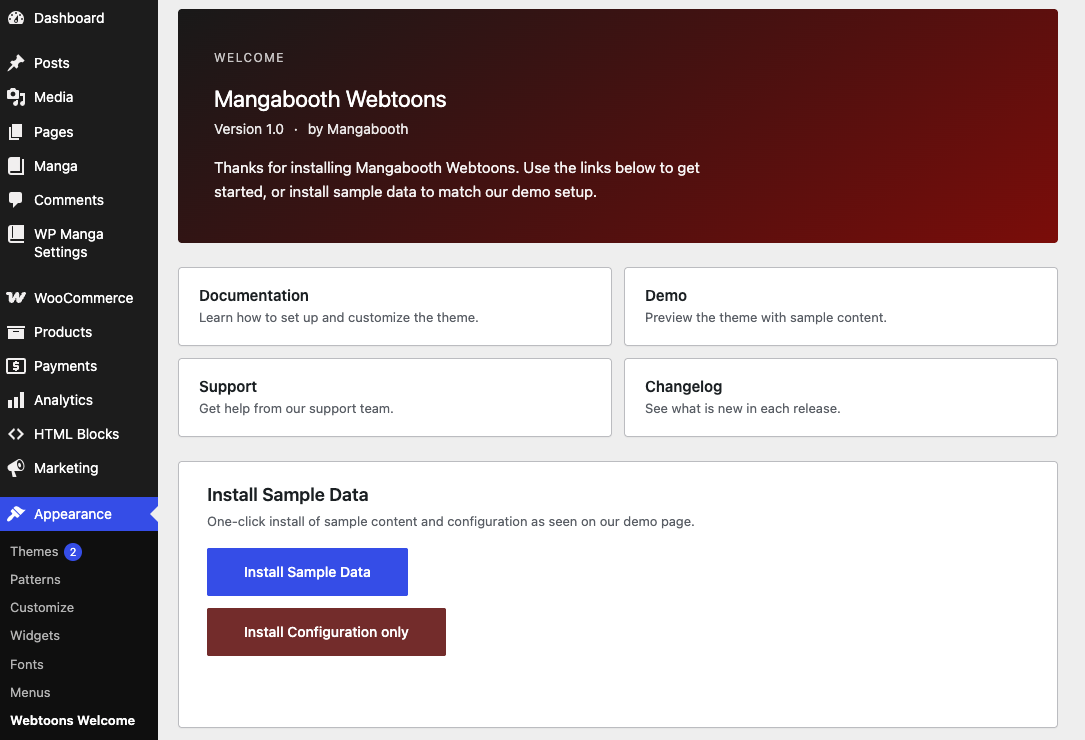
- Go to Appearance → Webtoons Welcome.
- Click Install Sample Data to create sample manga posts (20 series), homepage, Front-Page template pages, menus, widgets, theme mods, and configuration.
- Or click Install Configuration only if you already have manga content and only want pages, menus, widgets, and settings.
- Visit the site homepage when the installer finishes.
First-time setup checklist
- Appearance → Customize → Site Identity — upload the site logo. This appears in the header on all pages except the reading header (which has its own logo setting).
- Appearance → Menus — assign menus to Main Menu, Secondary Menu, Footer Menu, and User Menu.
- WP Manga → Settings — set the Manga Archive page and User Page (the page with
[manga-user-page]). - Settings → General — enable Anyone can register if you want the header Login button and sign-up modal.
- Settings → Reading — set a static homepage if you did not use sample data: Homepage = your Home page, Posts page optional.
- Create at least one manga series: WP Manga → Add New, add a featured image, genres, chapters, then set Webtoon Settings (release days, header images).
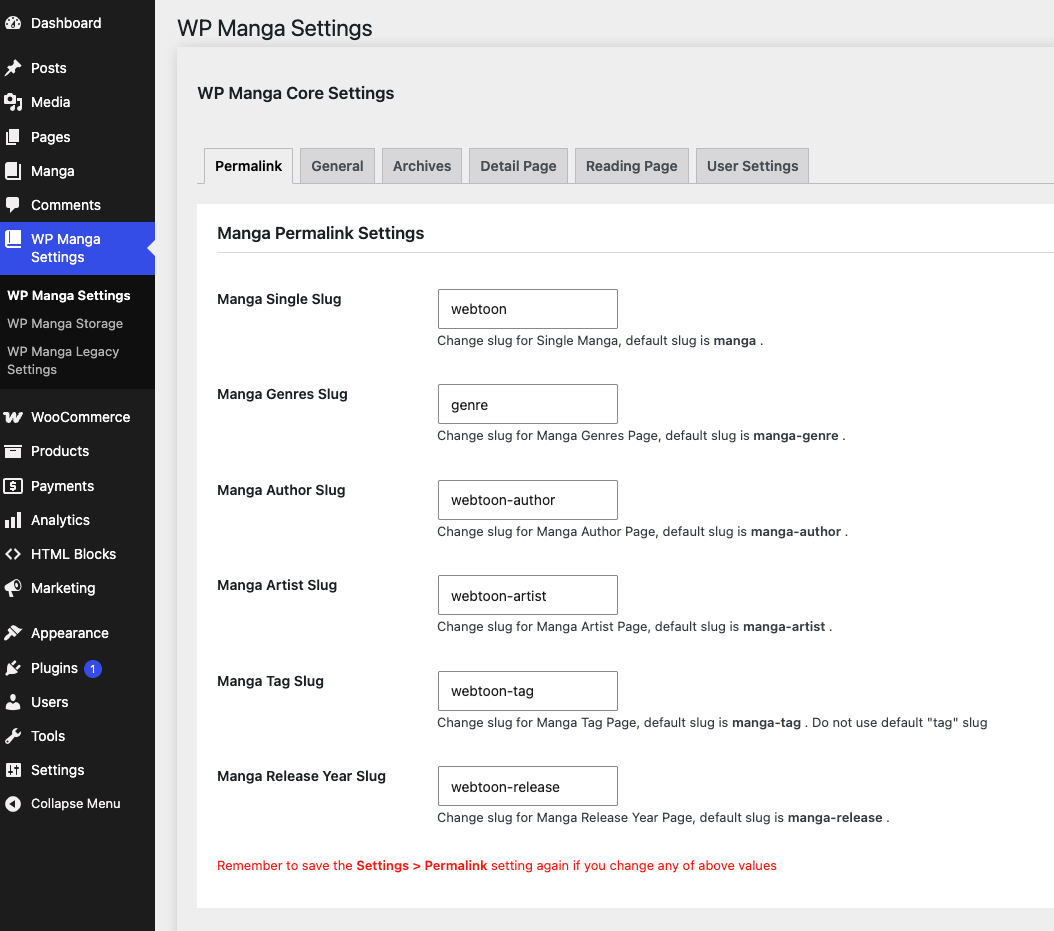
WP Manga (plugin) Settings
Open WP Manga Settings for core manga options.
Widgets Settings
Appearance → Widgets, or Customize → Widgets. Empty widget areas are simply hidden. Full-width vs. contained Top/Bottom sidebars is a Customizer layout option, not a widget setting.
| Sidebar | Placement |
|---|---|
| Webtoons – Top Sidebar | Above main content. Optional full width. |
| Webtoons – Top Secondary Sidebar | Second strip above content. Optional full width. |
| Webtoons – Main Sidebar | Right column next to Front-Page / archive listings. If empty, the listing is full width. |
| Webtoons – Bottom Sidebar | Below the listing. Optional full width. Sample data places an HTML Block here. |
| Webtoons – Bottom Secondary Sidebar | Second strip below content. Optional full width. |
| Webtoons – Series Detail – Before Chapters List | On the series page, above the chapter list — unless that series has its own Before Chapters List Content. |
| Webtoons – Footer Sidebar | Top of the footer, above logo / social / menu. |
| Left / Right Floating Banner | Fixed banners beside the content. Widgets override Customizer HTML for that side. |
The widget Webtoons: HTML Block outputs a published HTML Block by ID. Use it in any sidebar above. See HTML Blocks.
Theme Customize settings
Appearance → Customize. These options control look and layout. Manga data still comes from WP Manga.
Site identity & logos
Site Identity → Logo — used in the site header. Recommended height about 50px; width is flexible. If no logo is set, the site name is shown as text.
Webtoons – Header → Episode Reading – Header Logo — optional logo for the reading header only.
Appearance → Webtoons Welcome is the first-run hub (docs, demo, support, changelog, sample data). It is not a Customizer panel.
Layout
Section Webtoons – Layout Settings:
- Header Sidebar Fullwidth
- Header Secondary Sidebar Fullwidth
- Bottom Sidebar Fullwidth
- Bottom Secondary Sidebar Fullwidth
- Show Go To Top Button (default on)
Header (series defaults)
Section Webtoons – Header — used when a series has no Background Image of its own:
- Default Manga Detail Background Color (default
#000) - Default Manga Detail Text Color (default
#FFF) - Default Manga Detail Background Image
Archives & listing cards
Section Webtoons – Archives Page. These defaults apply to archives, Front-Page grids, and shortcode listings unless the shortcode overrides them.
| Option | Default | Notes |
|---|---|---|
| Thumbnail Size | Vertical | vertical (224×298) or square (224×224). Image sizes: webtoons, webtoons-square. |
| Show Genres | On | Genre links under the thumbnail. |
| Show Total Chapters | On | |
| Show Total Views | On | All-time views from WP Manga. |
| Show Total Liked | On | Bookmark / heart count. |
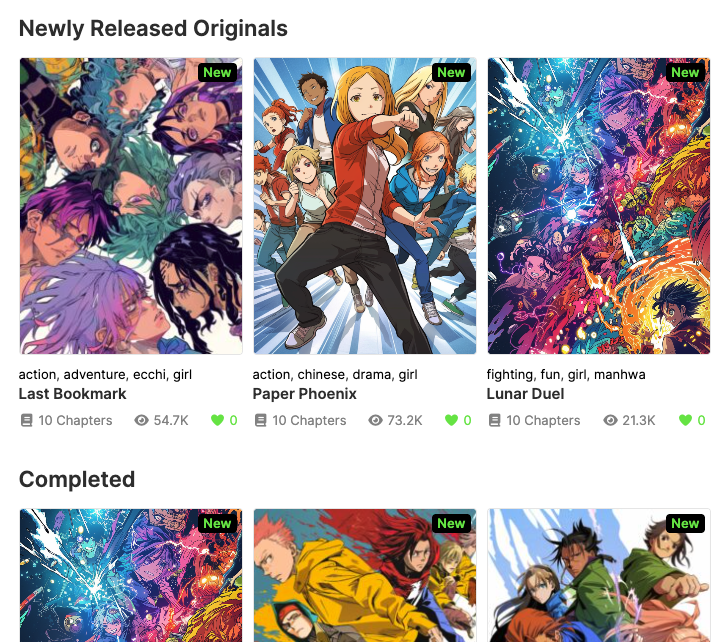
Shortcode attributes show_genres, show_chapters, show_views, show_liked, and thumbnail_size override these per instance.
Typography & colors
Section Webtoons – Typography. Color and type values are written as CSS variables on :root. Heading/content fonts are extra controls at the end of the same panel.
Fonts
| Setting | Default | Notes |
|---|---|---|
| Heading Font Family | Volte, sans-serif | Applied to headings and titles (h1–h6, .entry-title, .widget-title, .post-title). |
| Load Heading Font From Google Fonts | Off | Loads the first family name, weights 100–900. |
| Content Font Family | HelveticaNeue, sans-serif | Applied to body. |
| Load Content Font From Google Fonts | Off | Same as headings. |
| Font Family | "Roboto", sans-serif | CSS variable --font-family. |
| Font Size | 15px | --font-size |
| Font Size Small | 13px | --font-size-small |
| Font Size Heading | 24px | --font-size-heading |
| Font Size Widget Title | 18px | --font-size-widget-title |
| H4 Font Size | 22px | --h4-font-size |
| H4 Mobile Font Size | 16px | --h4-mobile-font-size |
| Line Height | 1.5 | --line-height |
Colors
| Setting | Default |
|---|---|
| Primary Color | #000 |
| Highlight Color | #68e751 |
| Text On Primary Color | #fff |
| Text On Highlight Color | #fff |
| Background Color | #f5f5f5 |
| Background Bookmarked Color | #f2f2f2 |
| Header Background Color | #fff |
| Header Text Color | #333 |
| Header Link Color | #333 |
| Header Link Hover Color | #545454 |
| Page - Text Color | #333 |
| Page - Link Color | #000000 |
| Page - Link Hover Color | #545454 |
| Body - Background Color | #fff |
| Body - Text Color | #333 |
| Body - Text Meta Color | #8c8c8c |
| Body - Link Color | #000000 |
| Body - Link Hover Color | #545454 |
| Border Color | #f5f5f5 |
| Button Background Color | #333 |
| Button Text Color | #fff |
| Button Hover Background Color | #444 |
| Button Hover Text Color | #fff |
| Button Secondary Background Color | #f2f2f2 |
| Button Secondary Text Color | #000 |
| Button Secondary Hover Background Color | #6d6d6d |
| Button Secondary Hover Text Color | #fff |
Spacing & layout tokens
These sit in the same Customizer section because they map to the remaining CSS variables.
| Setting | Default | Choices / notes |
|---|---|---|
| Margin | 0 | Example: 15px, 1.5rem, 0 |
| Padding | 0 | |
| Gap | 10px | |
| Border Radius | 4px | |
| Box Sizing | Border Box | Border Box, Content Box |
| Overflow X | Hidden | Hidden, Auto, Scroll, Visible |
Footer & social
Footer Settings — Footer Logo and Copyright Text. Placeholders: {year}, {site}. Empty copyright uses “© {year} {sitename}. All rights reserved.”
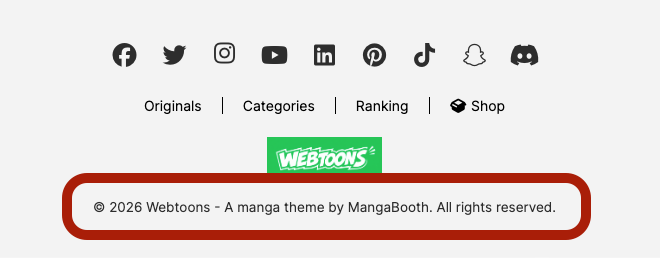
Social Accounts — Facebook, Twitter/X, Instagram, YouTube, LinkedIn, Pinterest, TikTok, Snapchat, Discord. Empty URLs are hidden in the footer.
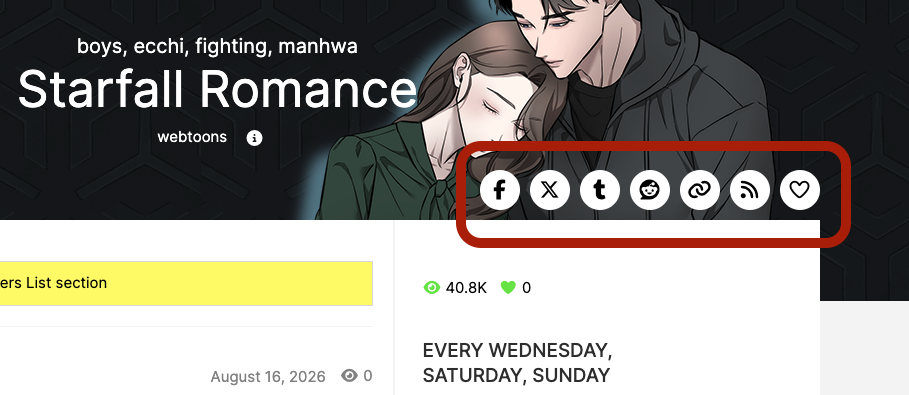
Social Share — toggles share buttons on series and reading pages: Facebook, X-Twitter, Tumblr, Reddit, Copy Link, RSS. The bookmark heart is not here; it follows WP Manga’s User bookmark option.
Floating banners
Fixed left/right banners beside .main-content. Hidden automatically below 1200px.
- Preferred: widgets in Appearance → Widgets → Left Floating Banner / Right Floating Banner.
- Fallback: in case no widgets are added, section Webtoons – Floating Banners — Left / Right Banner HTML (ad units, iframes, scripts). Users with
unfiltered_htmlcan store raw HTML; others are limited to post-safe HTML.
Leave both the sidebar and the HTML empty to hide that side.
SEO (Manga)
Section Webtoons – SEO (Manga). Leave a field empty to keep WordPress / plugin defaults. Descriptions are trimmed to 160 characters.
| Field | Placeholders |
|---|---|
| Manga Single – Title | %title% %sitename% %genre% %author% |
| Manga Single – Description | Same, plus %genre_clause% %author_clause% |
| Manga Reading – Title | %title% %chapter% %chapter_index% %vol% (when the chapter belongs to a volume) |
| Manga Reading – Description | %title% %chapter% %sitename% |
Example single title: %title% - Read Online Free | %sitename%
HTML Blocks
Reusable snippets stored as a private post type. Admin menu: HTML Blocks.
- Add a new HTML Block. Give it a title; put HTML, blocks, or shortcodes in the editor.
- Note the numeric ID in the list table (ID column).
- Embed with
[html_block id="123"]anywhere shortcodes work, or add the widget Webtoons: HTML Block to a sidebar and pick the block.
Self-references are blocked so a block cannot recurse infinitely. Only published blocks render. Sample data creates a Footer Block in the Bottom Sidebar.
Shortcodes
Place shortcodes in pages, HTML Blocks, widgets that parse shortcodes, or the “Before Chapters List” editor. Theme shortcodes wrap WP Manga Shortcodes; both plugins must be active.
Theme shortcodes
[webtoons_tab_trending]
Tabbed sliders for Trending (week views), Popular (all-time views), and New (latest). Built on [wp_manga_tabs] + [manga_post_slider].
| Attribute | Default | Description |
|---|---|---|
heading | Trending & Popular Series | Section title |
tabs | popular,new | Comma list of trending, popular, new |
trending_label / popular_label / new_label | Trending / Popular / New | Tab labels |
viewall | — | URL for a “View All” link next to the heading |
viewall_label | View All | |
viewall_target | _self | Link target |
[webtoons_tab_trending heading="Popular & New Series" tabs="popular,new" viewall="/originals/"][webtoons_tab_genres]
One tab per genre slug; each tab is a 6-column [manga_listing]. Required: genres.
| Attribute | Default | Description |
|---|---|---|
heading | Popular Series by Category | Section title |
genres | (required) | Comma-separated wp-manga-genre slugs. Invalid slugs are skipped. |
[webtoons_tab_genres heading="By Categories" genres="action,drama,romance"][webtoons_calendar]
Weekday tabs. Each tab lists series whose Release Schedule includes that day (via [manga_listing_by_day_release]).
| Attribute | Default | Description |
|---|---|---|
heading | empty | Section title |
items_per_row | 0 | Grid columns (0 = theme default) |
monday_label … sunday_label | Mon … Sun | Tab labels |
[webtoons_calendar heading="Daily" items_per_row="6"][manga_listing_by_day_release]
Low-level listing used by the calendar. You can use it alone.
| Attribute | Default | Description |
|---|---|---|
weekday | monday | monday … sunday |
count | 100 | Max posts |
items_per_row | 0 | |
item_layout | default | Same layouts as manga_listing |
num_chapters | 0 | Latest-chapters count for chapter layouts |
[manga_listing_by_day_release weekday="friday" count="20" items_per_row="5"][html_block]
| Attribute | Default | Description |
|---|---|---|
id | 0 | HTML Block post ID |
[html_block id="42"]WP Manga Shortcodes plugin
[manga_listing]
The main series grid. Sample homepage uses it for “Newly Released Originals”, “Completed”, and indie listings.
| Attribute | Default | Description |
|---|---|---|
heading | empty | Title above the grid |
heading_icon | empty | Font Awesome class |
count | empty | Number of series |
items_per_row | 0 | Columns |
orderby | latest | latest, alphabet, rating, trending, views, new-manga, input, random, date |
order | DESC | ASC or DESC |
genres / tags | empty | Comma-separated slugs |
ids | empty | Comma-separated post IDs (skips tax query) |
status | empty | e.g. end for Completed, on-going |
type | empty | Manga type meta |
chapter_type | all | all, manga (images), text, video |
author | empty | Author user ID; 0 = current user |
following | off | If present, only bookmarked series for the logged-in user |
adult | — | 1 / 0 to include or exclude adult-flagged series |
item_layout | default | default, big_thumbnail, simple, chapters |
num_chapters | empty | For chapter-style layouts |
sidebar | 0 | Set if the listing should assume a sidebar column |
show_genres show_chapters show_views show_liked | Customizer | 1 or 0 |
thumbnail_size | Customizer | vertical or square |
[manga_listing heading="Completed" count="5" items_per_row="5" orderby="date" status="end"]
[manga_listing heading="Indie" show_genres="1" show_liked="0" count="5" items_per_row="5" thumbnail_size="square"]
[manga_post_slider]
| Attribute | Default | Description |
|---|---|---|
post_type | post | Use wp-manga for series |
count | 5 | Total slides queried |
number | 2 | Visible slides |
orderby | latest | latest, view, random, comment, title, input |
time | all | For views: day week month year all |
cats / tags / ids | empty | Filters |
style | 1 | Slider style 1–4 |
arrows | off | 1 to show arrows |
dots | on | 0 to hide dots |
infinite | on | 0 to disable looping |
autoplay | off | 1 to autoplay |
thumb_ratio | vertical | vertical or landscape |
rank | off | 1 shows rank numbers (theme slider item) |
show_genres show_chapters show_views show_liked | Customizer | Theme slider item |
[manga_post_slider post_type="wp-manga" count="10" number="5" orderby="view" time="week" arrows="1" dots="0" rank="1"][wp_manga_tabs] + [wp_manga_tabcontent]
Generic tab wrapper. Tab IDs are sanitize_title of the comma-separated tabs labels. Each inner shortcode must set matching tab.
[wp_manga_tabs heading="Picks" tabs="Hot,New" viewall="/manga/" viewall_label="See all"]
  [wp_manga_tabcontent tab="hot"][manga_listing count="6" orderby="views"][/wp_manga_tabcontent]
  [wp_manga_tabcontent tab="new"][manga_listing count="6" orderby="new-manga"][/wp_manga_tabcontent]
[/wp_manga_tabs]
Optional: viewall, viewall_label, viewall_target.
[manga_info]
Series details block (thumbnail, meta, optional chapter list). Defaults to the current post if id is omitted.
| Attribute | Default |
|---|---|
id | Current post ID |
manga_details / manga_title / chapters | 1 |
title_link | 0 |
author_link artist_link genre_link tag_link | 1 |
order / orderby | ASC / name (chapters) |
[manga_info id="123" chapters="1" title_link="1"][manga_chapters]
| Attribute | Default | Description |
|---|---|---|
id | Current series on single | |
count | 5 | Latest chapters |
style | 1 | List style |
cols | 1 | 1–4 columns |
border | 0 | |
extend_name | off | Show chapter extend name |
[manga_chapters id="123" count="10" cols="2"][manga_grid]
Fixed 9-item grid. Attributes: orderby, order, genres, tags, ids, chapter_type, author.
[manga_grid genres="action" orderby="views"][manga_heading]
Styled heading. Content is the title text.
| Attribute | Default |
|---|---|
id | auto |
icon | empty |
style | 1 |
border | 1 |
heading | h4 (HTML tag) |
[manga_heading icon="fa fa-star"]Editor picks[/manga_heading][manga_blog]
Blog post cards (standard posts, not manga).
Attributes: count (6), cats, tags, ids, order, orderby, items_per_row (3 or 2).
[manga_blog count="4" items_per_row="2" cats="news"][wp-manga-my-bookmarks]
Logged-in user’s bookmarked series. Guests see nothing.
Attributes: style (1 or 2), column (must divide 12; default 3 → 4-column bootstrap).
[wp-manga-my-bookmarks style="1" column="3"]WP Manga user dashboard
[manga-user-page]
Renders bookmarks, history, account settings, and reader settings. Put it on one page and select that page in WP Manga → Settings → User Page.
[manga-user-page]Hooks & filters for developers
Add callbacks from a child theme’s functions.php or a small custom plugin. Prefix your functions. Theme text domain: webtoons.
Theme actions
| Hook | Args | When it fires |
|---|---|---|
webtoons_before_main_content | — | Front-Page, archives, search, pages, blog index — used by the theme to print floating banners. |
webtoons_before_manga_archive | $manga_query, $actual_query_vars | Before the series grid. Default callback prints the archive heading, count, and order-by filter. |
webtoons_after_manga_archive | — | After the grid / pagination. |
webtoons_after_manga_item | — | After each card in Front-Page / archive loops. |
webtoons_before_loop_manga_item | $manga_id | Start of a listing card. |
webtoons_after_loop_manga_item | $manga_id | End of a listing card. |
webtoons_before_loop_manga_thumbnail | $manga_id | Inside the thumbnail link, before the image. Default: “New” badge. |
webtoons_after_loop_manga_thumbnail | $manga_id | After the thumbnail image, still inside the link. |
add_action( 'webtoons_after_loop_manga_item', function( $manga_id ) {
    echo '<span class="custom-flag">' . esc_html( get_post_meta( $manga_id, 'my_flag', true ) ) . '</span>';
} );
Theme filters
| Filter | Value / extra args | Purpose |
|---|---|---|
webtoons_front_page_query_args | $query_args, $page_id | Modify the Front-Page WP_Query args (tax/status/weekday). |
webtoons_front_page_orderby_options | $orders, context array (orderby, wd, genre, page_id) | Change Order By links. |
webtoons_front_page_weekdays_options | $weekdays, context (wd) | Relabel or drop weekday tabs. |
webtoons_front_page_categories_options | $genre_options, context (genre) | Genre filter tabs. |
webtoons_front_page_ranking_options | $ranking_options, context (orderby, page_id) | Ranking filter tabs. |
webtoons_archive_heading | string | Default archive H1 (“All Webtoons”). |
webtoons_archive_taxonomy_heading | string | H1 on genre/tag archives. |
webtoons_user_settings_url | $url, $current_user | Header user-menu settings URL. |
webtoons_tab_trending_slider_shortcode | $slider_shortcode, $tab | Replace the slider inside a trending tab. |
webtoons_tab_genres_manga_listing_shortcode | $shortcode, $genre_obj | Replace the listing inside a genre tab. |
query_vars | — | Theme adds public vars wd and genre. |
add_filter( 'webtoons_front_page_query_args', function( $args, $page_id ) {
    $args['posts_per_page'] = 24;
    return $args;
}, 10, 2 );

add_filter( 'webtoons_archive_heading', function() {
    return __( 'Browse series', 'my-child' );
} );
WP Manga / reading hooks used in this theme
These fire from theme templates. They are the usual extension points for chapter lists and reading UI.
| Hook | Type | Args | Use |
|---|---|---|---|
wp-manga-chapter-listing | action | $manga_id | Series chapter list. Theme prints “before chapters” content at priority 10, then the list. |
madara_before_chapter_listing | action | — | Before the <ul> of chapters. |
wp_manga_after_chapter_listing | action | — | After the chapter list. |
wp_manga_before_chapter_name | action | $chapter, $manga_id | Before chapter title link. |
wp_manga_after_chapter_name | action | $chapter, $manga_id | Theme adds chapter view count here. |
wp_manga_chapters_list_after_chapter_item | action | $chapter, $manga_id, $index | After each <li>. |
wp_manga_chapter_item_class | filter | $class, $chapter, $manga_id | Extra CSS classes on a chapter row. |
madara_archive_chapter_date | filter | HTML, chapter id, date, link | Relative date markup. |
wp_manga_discussion | action | — | Comments on series and reading pages. |
wp_manga_before_chapter_content / wp_manga_after_chapter_content | action | $cur_chap, $manga_id | Around chapter body. |
wp_manga_chapter_content_alternative | filter | string | Replace default chapter HTML (paywall, etc.). |
madara_before_text_chapter_content / madara_text_chapter_content / madara_after_text_chapter_content | action | $post on content | Text chapters. |
madara_before_video_chapter_content / madara_after_video_chapter_content | action | — | Video chapters. |
madara_before_chapter_image / madara_after_chapter_image | action | $paged, $total | Around each page image. |
wp_manga_chapter_image_url | filter | $url, $host, $link, $post_id, $name | Rewrite image CDN URLs. |
wp_manga_prev_chapter_link_html / wp_manga_next_chapter_link_html | filter | HTML, URL, chapter, manga id | Prev/next buttons in reading header. |
wp_manga_chapter_nagivation_button_class | filter | class, chapter, manga id | Wrapper class for prev/next. |
wp-manga-reading-chapters-selectbox | action | $chapter, $this_vol_all_chaps, 'manga' | Chapter dropdown. |
after_manga_single | action | — | End of reading template. |
manga_login_button | filter | HTML | Submit button on the login modal. |
login_form / register_form / lostpassword_form | action | — | Standard WP login hooks inside the modal. |
add_filter( 'wp_manga_chapter_image_url', function( $url, $host, $link, $post_id, $name ) {
    return 'https://cdn.example.com/' . ltrim( $link, '/' );
}, 10, 5 );
Public query vars
| Var | Example | Used by |
|---|---|---|
wd | ?wd=wednesday | Front-Page weekday filter |
genre | ?genre=action | Front-Page category filter |
orderby | ?orderby=trending | Front-Page / ranking sort |
m_orderby | ?m_orderby=views | Manga archive / search sort (WP Manga) |
Useful post meta (series)
| Meta key | Type |
|---|---|
_webtoons_release_schedule | Array of weekday keys |
_webtoons_background_image | Attachment ID |
_webtoons_characters_image | Attachment ID |
_webtoons_before_chapters_list_content | HTML string |
User meta (authors)
_webtoons_user_social_facebook, _instagram, _x, _youtube, _tiktok — URLs from the profile screen.
Template overrides
Copy any file from wp-content/themes/webtoons/ into a child theme using the same relative path. Manga templates live under wp-manga/ (for example wp-manga/manga-single.php, wp-manga/content/content-archive.php).
Do not edit the parent theme directly if you expect updates. Prefer hooks and Customizer settings when they already cover the change.
Support & links
- Documentation: mangabooth.com/docs
- Demo: mangabooth.com/demo
- Support: mangabooth.com/support
- Changelog: mangabooth.com/changelog